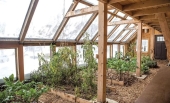
My dream has always been to live close to the land. My goal is simpler, sustainable, more self-reliant living. In 2009 my husband and I bought a neglected 1920s-built bungalow on 5 acres, which we've gradually built into our homestead.
This is a good question, Daniel, although I would say "books" rather than "book." One thing I've learned in my years of homesteading is that there are no "one size fits all" solutions for anything. What works for one person in one part of the world, may not give the same success to another person in another part of the world. Authors share what works for them, but there are so many variables.
That said, I agree with the others that the "classics" are invaluable. They may not be specifically for off-grid living, but most of them use tried and true traditional technologies that are applicable to off-grid lifestyles.
Many of these are likely available at a public library.
My other suggestion would be to purchase physical copies of the books you like. Digital is great for determining if something is a good fit, but digital stuff can disappear or become inaccessible if devices have problems. A physical home library will always be there. We started with general reference books like I listed, and then gradually expanded our library to include paper books on specific subjects as needed.
I'd say, if one wanted to use only flour, water, and baking soda, to first make a paste of the flour and water, cover the bowl with a dishtowel, then let it sit overnight, or even a day or two until bubbles started to form. In other words, let it ferment a bit. Then it is slightly acidic and the alkaline baking soda will react with it to create carbon dioxide bubbles, giving the final baked product a bit of a rise.
I think the alfredo sauce is a great idea for mac and cheese. My alfredo recipe is a bit different from Catie's (which I definitely plan to try), so I'd like to add it to the mac and cheese recipe collection:
1 cup heavy cream
1/2 cup butter
1 cup fresh Parmesan cheese, grated
1/2 teaspoon garlic powder
Salt and pepper to taste
Melt the butter in a saucepan, then add the cream and garlic powder.
Simmer 5 minutes then add the cheese, salt, and pepper.
When the cheese is melted and the sauce is creamy, it's ready to pour over pasta.
I use this for Fettuccine Alfredo, but I think any cheese could be substituted for the Parmesan, as well as the pasta of choice.
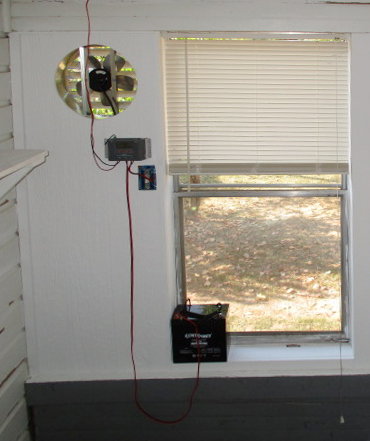
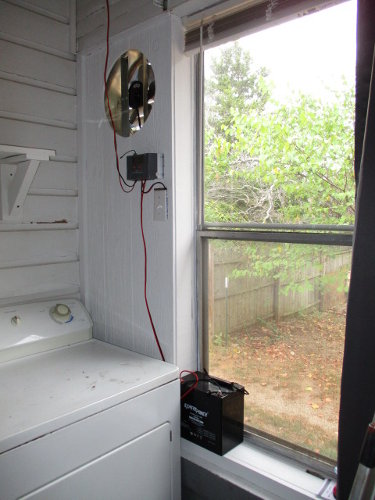
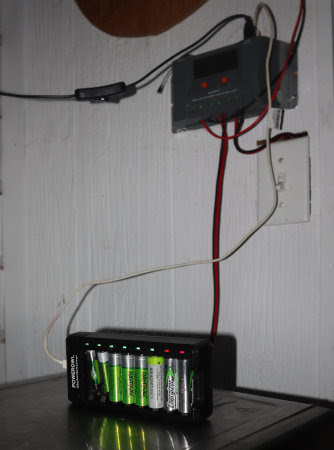
I have a couple of small solar setups that serve as recharging stations and for power emergencies. This first one was originally to install a solar vent fan on our back porch. Our back porch is my summer and canning kitchen, which helps keep cooking and canning heat out of the house and I wanted a vent fan there.
The setup was inexpensive and simple:
- 80-watt solar panel
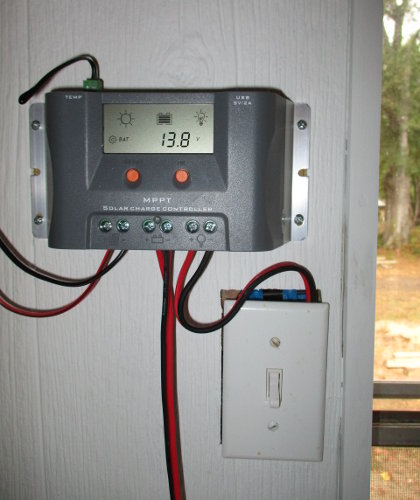
- small MPPT solar charge controller
- 35 amp-hr wheel chair battery
my small solar recharging station
The solar panel is installed on the roof and connected to an inexpensive MPPT solar charge controller.
The light switch was installed to operate the vent fan. The problem was that the 80-watt fan drained the battery too quickly, so I quit using it for that purpose and the switch is not necessary.
The battery is also connected to the charge controller.
Since the battery resides indoors, I installed a sealed (gel) battery.
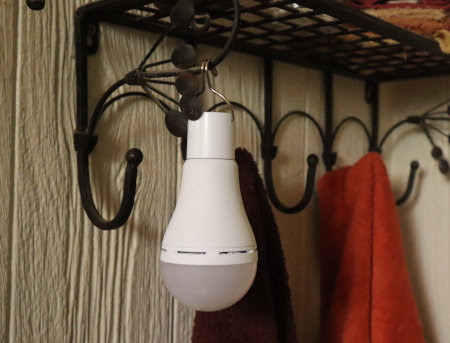
We use our charging station all the time for everything rechargeable including batteries, headlamps, flashlights, camera, phone, and solar light bulbs.
rechargeable solar light bulbs for camping
The lightbulbs are wonderful for after dark to light the kitchen, bathroom, and bedrooms, or as a reading light. Better than candles, I think, because there's no danger of pets or kids accidentally knocking them over.
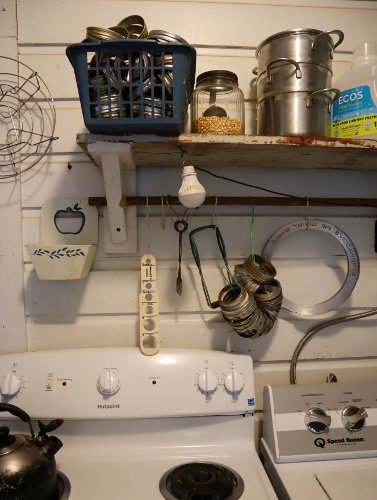
I also have a USB light bulb plugged into the charge controller. It resides over the stove and we use it all the time even when there isn't a power emergency. If needed, it can shine out the back door so we can negotiate the back steps at night when the grid is down.
light bulb with a USB plug is plugged into the charge controller
Our second emergency solar station is larger and used differently. I'll see if I can rustle up some photos to share.
The recipe calls for equal parts of ricotta cheese and kefir, seasoning to taste with salt, pepper, onion and garlic powder, and a tablespoon of pickle juice. I think yogurt or buttermilk could be substituted for the kefir. This is a favorite on garden salads.
The other day my toaster oven died so i went out to look for a replacement. I was surprised at the selection. Three years ago when I bought the toaster oven I'm replacing, almost all the options were digital. I'm not a fan of digital components and sure enough the clock went out on that toaster oven in less than a month. Anyway, when I looked the choices for toaster ovens at the big box store, almost all of them were mechanical, i.e. knobs and no digital keypads or read-outs. Only a few digital models were available.
I experienced something similar in shopping for a washer and dryer. My 40-year-old washing machine needs replacing and I ordered a mechanical Speed Queen. It's been on back order for 3 months. I had a similar experience looking into a new dryer. Mostly I line dry but having a dryer is handy for threshing wheat or when we have weeks of rain or freezing weather. The mechanical models I looked at (no digital and no smart features) are all on back order.
I admit my observations are limited, but it seems that old-fashioned mechanical appliances are actually quite popular. I can't help but wonder if people aren't preferring these once again because of durability and longevity. I'm wondering if digital features are starting to lose popular appeal?
I'm really encouraged to read this because I have a similar problem in the front room of our house. The southwest corner wall is either terribly hot or cold to touch depending on the season. Like R, I question whether there is insulation in that corner. I've been wondering if a fabric covering would help. it seems like I need to try this! Covering the large window with a quilt + thermal curtain liner + mylar reflective blanket has helped a lot, but I still need to tackle that corner.
Mine arrived yesterday afternoon and I just love them! The topic choices are fantastic and the art work is amazing. The overall design is professional and very appealing. Plus, I really like the color purple.



 My dream has always been to live close to the land. My goal is simpler, sustainable, more self-reliant living. In 2009 my husband and I bought a neglected 1920s-built bungalow on 5 acres, which we've gradually built into our homestead.